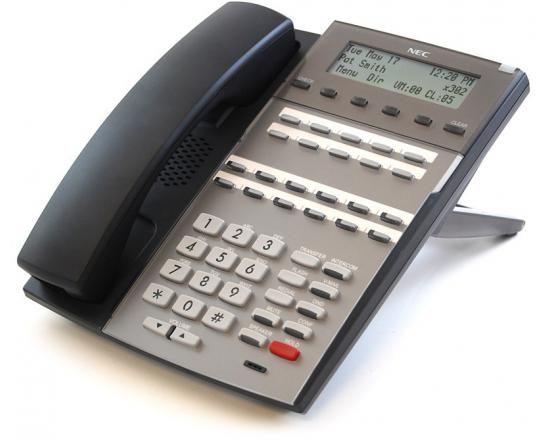
Setting A Temporary Greeting On A NEC DSX 22B Display Tel

Posted on

The first step is to record your temporary message in an instruction mailbox.  In this case we are using instruction mailbox 803 (003).  Before you record a new message in mailbox 803 make sure that it is not being used by choosing the “listen option” before re-recording.  This is assuming you have a TelephoneSystemsDirect.com NEC DSX phone system consult with your telecommunication manager before making any changes.  For further assistance call 866-898-2303 option 3.

STEP 1: PRESS ICM, DIAL 700.

“please enter the mailbox number”

STEP 2: DIAL 300

“you have no new messages”

STEP 3: DIAL 72

“welcome to the system administrator menu”

STEP 4: PRESS THE BUTTON UNDER INST (OR NEXT TO INSTRUCTION ON A 34-BUTTON SUPER DISPLAY PHONE)

“please enter the mailbox number for the instruction menu”

STEP 5: DIAL 803 (may be 003 on older systems)

“press r to record an instruction menu”

STEP 6: PRESS THE BUTTON UNDER REC

“start recording when you hear the tone, press the # key when you are done”

Thank you for calling. Our normal operating hours are Monday through Thursday 9:00 am to 4:30 pm and Friday 9:00 am to 3:00pm. To leave a message press 1, and you will be contacted as soon as possible. Thank you for calling.

STEP 7: PRESS THE BUTTON UNDER DONE OR #

STEP 8:  PRESS THE BUTTON UNDER EXIT AND HANG UP

Once your greeting is recorded you need to set it as the override mailbox:

STEP 1: PRESS ICM, DIAL 700.

“please enter the mailbox number”

STEP 2: DIAL 300

“you have no new messages”

STEP 3: DIAL 72

“welcome to the system administrator menu”

STEP 4: PRESS 6 FOR ANSWER SCHEDULE OVERRIDE

“please enter the table number”

STEP 5: PRESS 1

“Answer schedule over ride is off…”

STEP 6: PRESS THE SOFTKEY UNDER ON, PRESS THE SOFTKEY UNDER MAILBOX AND ENTER 803 (003 on older systems)

STEP 7:  PRESS THE SPEAKER BUTTON TO HANG UP

Don’t forget to turn answer schedule override off when you return to the office.  This can be done by following the above steps and choosing OFF at step 6.
NEC DSX 22B Display Tel Recording A Night Greeting

Posted on

STEP 1: PRESS ICM, DIAL 700.

“please enter the mailbox number”

STEP 2: DIAL 300

“you have no new messages”

STEP 3: DIAL 72

“welcome to the system administrator menu”

STEP 4: PRESS THE BUTTON UNDER INST (OR NEXT TO INSTRUCTION ON A 34-BUTTON SUPER DISPLAY PHONE)

“please enter the mailbox number for the instruction menu”

STEP 5: DIAL 801

“press r to record an instruction menu”

STEP 6: PRESS THE BUTTON UNDER REC

“start recording when you hear the tone, press the # key when you are done”

Thank you for calling. Our normal operating hours are Monday through Thursday 9:00 am to 4:30 pm and Friday 9:00 am to 3:00pm. To leave a message press 1, and you will be contacted as soon as possible. Thank you for calling.

STEP 7: PRESS THE BUTTON UNDER DONE OR #

STEP 8:  PRESS THE BUTTON UNDER EXIT AND HANG UP

NEC DSX Intramail PRO Voice Mail

Posted on

NEC DSX Intramail PRO Voice Mail

One of the reasons why the NEC DSX-40, NEC DSX-80 and NEC DSX-160 telephone systems have become so popular in today’s business marketplace might be because of their NEC DSX Intramail PRO Voice Mail. NEC DSX Intramail voicemail has emerged as a viable option because it features programming simplicity, powerful memory storage and an affordable price.

There are a number of functions which highlight the voicemail services available on the NEC DSX systems. The first is a digitized emulation of an answering machine. Once a voicemail is delivered, it is automatically routed to the corresponding mailbox or mailboxes. (Callers have the option of leaving voice mails on multiple mailboxes at the same time.) Callers can leave their caller ID, and that is true for people inside and out of the business intranet.

If you decide upon the 34-button display telephones, it will greatly facilitate the management of your employees’ voice mails. They will have one-touch forwarding as well as one-touch voice mailbox access and retrieval. The whole NEC DSX Intramail PRO Voice Mail package is streamlined so your employees can check faster, more often, and with less hassle.

On the services side, we are here to make sure that your employees get more out of their NEC DSX Intramail PRO Voice Mail. At the time of purchase, come to us with a set of business requirements, including number of employees, number of headsets, and voice mailbox numbers. We’ll do the programming for you so your employees don’t have to. Once they first log into the system, they’ll be able to modify their own mailboxes to individual specifications.

Voice Over IP Long Distance

Posted on
Voice Over IP Long Distance
Why are voice over IP long distance phone systems so much more cost-effective than traditional phone lines? They utilize the limitless nature of online connectivity. The Internet knows no boundaries. Voice over IP long distance telephone lines are based on technologies that break up voice into data packets, which are then sent instantly over the Web.
There are three principle ways that a consumer or business employee would use VoIP. First, in the case of a single telephone line, digital telephone sets can save a household a lot of money from month to month. Secondly, you can make local calls from anywhere, regardless of your location. This is great for remote employees who don’t want to pay exorbitant long distance fees. Third, VoIP can unite the business phone systems of two separate offices, which facilitates intra-office calling by way of internal extensions instead of outside calls. Again, this step can really cut operating costs.

Switching to VoIP is really a “no-brainer.” To get started, consider our most popular phone system, the Samsung OfficeServ phone system. We have VoIP telephone systems to match your needs and your budget.

Enterprise VOIP Solutions

Posted on

Enterprise VoIP solutions include digitizing, encoding, and sending voice telephone signals over the Internet or a data network. Businesses of all sizes can benefit not only from a cost perspective, but also in terms of quality of service and ease of use as well. Different VoIP solutions are available depending on your unique needs. For instance, would it make more sense for you to manage your telecommunications in-house, or outsource through a hosting service provider?

Enterprise VoIP solutions reduce the complexities and costs associated with an initial capital investment. Some VoIP solutions, like those from Samsung iDCS, allow administrators to control their systems through a web-based browser interface. Changes can easily be made to employees’ phone and voice mail settings.

Today’s enterprise VoIP solutions also feature heightened security measures. One of the main concerns regarding VoIP in its infancy was the threat that these networks would be subject to the same security risks as other data networks. Companies like Samsung and Panasonic have worked hard to vastly reduce the security risk associated with voice over IP networks.

In business, any measure that can be taken to reduce costs and streamline business efficiency should be seriously considered. Enterprise VoIP solutions accomplish just that, and that’s why more American businesses are switching to VoIP. Your cost savings over time will be significant, and your phone and data networks integrated like never before.

Bulk Purchasing Telephone Systems

Posted on
Bulk Purchasing Telephone Systems

If you are the owner of a telecommunications retail store or the CEO of a corporation looking to save on costs, bulk purchasing telephone systems may be a great idea. Obviously, the greatest benefit of bulk purchasing is the cost. By purchasing a number of telephone systems at once, you stand to receive significant savings on your total telephone system.

A plug-and-play telephone system often benefits from some of the same advantages as bulk purchases. Because these systems come complete with anywhere from 5 to 500 phones, purchasers can save money off of the normal retail price. This will allow businesses to buy a fully integrated system (and prevent any worries over incompatible parts) at a cost they can afford, with the exact system specifications they need.

Some examples of groups who may buy bulk telephone systems include businesses, universities, hospitals, and a variety of other organizations. An integrated telephone system will allow you to cut down on training time (since every employee has the same phone, cross-training is easily accomplished). In addition, you can order extra parts to keep around the office in case of any hardware issues. This will eliminate down time, as a problem component can be easily switched for another of the same model.

Bulk purchasing telephone systems can be a great option if you run a retail shop. The greater your selection, the happier your customers, and the more likely you are to make a sale. New telephone systems are coming on the market every day, so it is a good idea to keep your inventory stocked with the latest offerings.

Samsung IDCS 100 Telephone System

Posted on

Samsung IDCS 100 Telephone System

The Samsung iDCS 100 telephone system has become the industry standard for many smaller enterprises. While priced affordably, the iDCS 100 system offers higher-end features such as Voice-over Internet Protocol (VoIP) standard or optional in each of its configurations. By allowing your employees to use the Internet to make phone calls in this manner, the iDCS 100 can vastly reduce the costs associated with large volumes of long-distance and international calls.

One of the iDCS 100 phone system’s chief attributes is its flexibility. It initially incorporates six lines, eight digital stations, and two analog stations, with the ability to expand up to 36 lines and 50 stations. That means that as your business grows, your phone system can easily and painlessly grow with it. Moreover, you can incorporate ISDN support and digital voice mail, and iDCS’s Uniform Call Distribution ensures that your call volumes will be evenly spread out in times of peak volume, making it perfect for businesses that might otherwise become overwhelmed or increasingly inefficient at the busiest times of day.

Practically No Programming
The only programming that you and your employees will be responsible for is basic directory listings and speed-dial settings. Consequently, as a purchasing manager, you can be sure that your reduced costs and increased efficiency in the workplace will not come at the expense of wasted programming time or a steep learning curve.

With the ability to conform to a variety of existing phone line systems and the added comfort of system expansion when you need it, the Samsung iDCS 100 telephone system is the perfect tool for small business. Samsung is world-renowned for its unflinching commitment to quality, which means that you can look forward to years of trouble-free service. Digital telephony and computer integration are the future of business communication, and that future starts with the Samsung iDCS 100 telephone system.

Samsung OfficeServ Call

Posted on
Samsung OfficeServ Call

Samsung OfficeServ Call organizes your life by integrating call management into your computer. Business efficiency can be most effectively measured in the time it takes to do repetitive tasks. If, during your daily business routine, you need to call a lot of people at different times of the day, then call management should be near the top of your priorities.

If you can create a rigid call schedule format that manages your incoming and outgoing calls, your employees are better utilized during the workday. This is precisely what Samsung OfficeServ Call does. If your employees talk to 20 or 30 different people every day, that means that they have to spend time physically entering names, addresses, telephone numbers, and any other pertinent information into their contact lists.

Samsung OfficeServ Call application automatically stores this information as calls are conducted. Calls are effectively managed from the PC, and employees can see who is waiting on hold. They also have the power of limitless call histories, as well as the convenience of sending text messages. When you integrate your employees’ computers with their primary communicative tools, their phones, you have effectively increased business productivity.

In addition to the Samsung OfficeServ Call application, we offer a number of accessories that are also part of the OfficeServ System. OfficeServ Softphone, OfficeServ Link, OfficeServ Unified Messaging, OfficeServ OpenTSP, and OfficeServ Operator are just a few. Each application satisfies a particular need, yet they can be used independently of each other. Give us a call, and we will break down which apps will be of the most use to your business.

Why Buy your Samsung Phone System from us?

Posted on Leave a comment

Advantages to buying your Samsung phone system from Telephonesystemsdirect.com

We have been selling, installing and servicing Samsung telephone systems since 1990. We have 18 years of experience and thousands of happy, satisfied customers. In 2005, 2006, 2007, 2008 (to date) we sold and installed more Samsung phone systems to end users, like yourself, than any other Samsung dealer in North America! Other Samsung dealers call our tech support department rather than Samsung; think about that.

In order to reach the national market we have pioneered and perfected the sale and service of Samsung telephone systems utilizing the Internet, without sacrificing our excellent technical support. Through much research and many hours of brain storming we developed our unique, Plug and Play Small Business Telephone System. Our unprecedented concept has given the national business community the opportunity to own their own cutting edge Samsung digital communication platform at a fraction of the cost of our nearest competitors.

When you purchase one of our Plug and Play packages you get so much more than just Samsung hardware. You get:

  • New Samsung hardware and the latest software, never used or refurbished.
  • A Samsung phone system fully assembled, mounted on a backboard, ready to plug in and use.
  • A Samsung phone system completely programmed to your custom specifications by a fully certified Samsung technician with 18 years of Samsung experience.
  • Simple, user friendly instructions about how to unpack, mount and plug in your lines and phones.(Includes a 7 minute video, color pictures and easy to understand text)
  • Free telephone tech support with the technician who assembled and programmed your system.
  • Free end user training for you and your staff.
  • A five year parts warranty.
  • A State-of-the-art Samsung telephone system, tech support second to none and a fair, honest price.
  • On site installation (optional at a fair price) if you or your staff are not going to mount and plug in your system.

The warranty and tech support that you receive when you do business with us is worth far more than what you pay for the hardware. Don’t be fooled by those other retailers with claims of lower prices and similar packages. Do your homework, ask the right questions, check references and your efforts will be rewarded.

Samsung iDCS 500 VoIP Digital Telephone System

Posted on Leave a comment

The Samsung iDCS 500 is a complete, Voice over IP, digital telephone system. One sample configuration is for 12 telephone lines and 32 digital station ports. The Samsung iDCS 500 can expand to 216 Lines and 384 digital telephones. The Samsung iDCS 500 can accommodate up to 9 T1 or PRI digital trunk cards. This system has the SVMi-8 voice mail with email messaging. Get you voice mail sent to your email box in wav format. Record conversations into your email box in wav format. You can also add any of the Samsung OfficeServ computer telephony software options.

A telephone line is the number you get from the phone company that allows you to make calls outside of your phone system. The iDCS 500 expands by adding 8 port line cards or the T1/PRI card. The iDCS 500 can accommodate up to 216 telephone lines.

A digital station port connects the iDCS 500 to a Samsung proprietary multi-button telephone such as the iDCS 8D, the iDCS 18D or the iDCS 28D. The iDCS 500 can accommodate 384 of these digital telephones by adding 8 port or 16 port digital station cards.

An analog station port connects the iDCS 500 to miscellaneous communication devices such as a Credit Card Machine, FAX, or any portable telephone. The iDCS 500 requires an optional 4 port, 8 port or 16 port analog station card to accommodate analog communication devices

Purchase Samsung OfficeServ Telephones

Samsung OfficeServ 7100 telephone systems

Samsung OfficeServ 7200 telephone systems

Samsung OfficeServ 7400 telephone systems

Samsung OfficeServ 100 telephone systems

Samsung OfficeServ 500 telephone systems